How to find the new presets from updates H90

Home Forums Products Stompboxes How to find the new presets from updates H90

Viewing 1 reply thread
  • Author
    Posts
    • #194191
      santisandoval89
      Participant

        Hi!

        I downloaded the new update containing the granular algorithms and I love them!

        I had a lot of fun but still found a bit challenging to understand how everything works, and I think that getting access to the presets made by eventide would be useful. I know that there are some individual presets available when loading an algorythm, but I’m refering to those in the videos, like the ones that have two different programs at the same time. I wouln’t like to do a factory reset and loose all of my presets, so do you guys know if there’s a way to access those factory presets for the new algorythms?

      • #194192
        tbskoglund
        Keymaster
        Eventide Staff

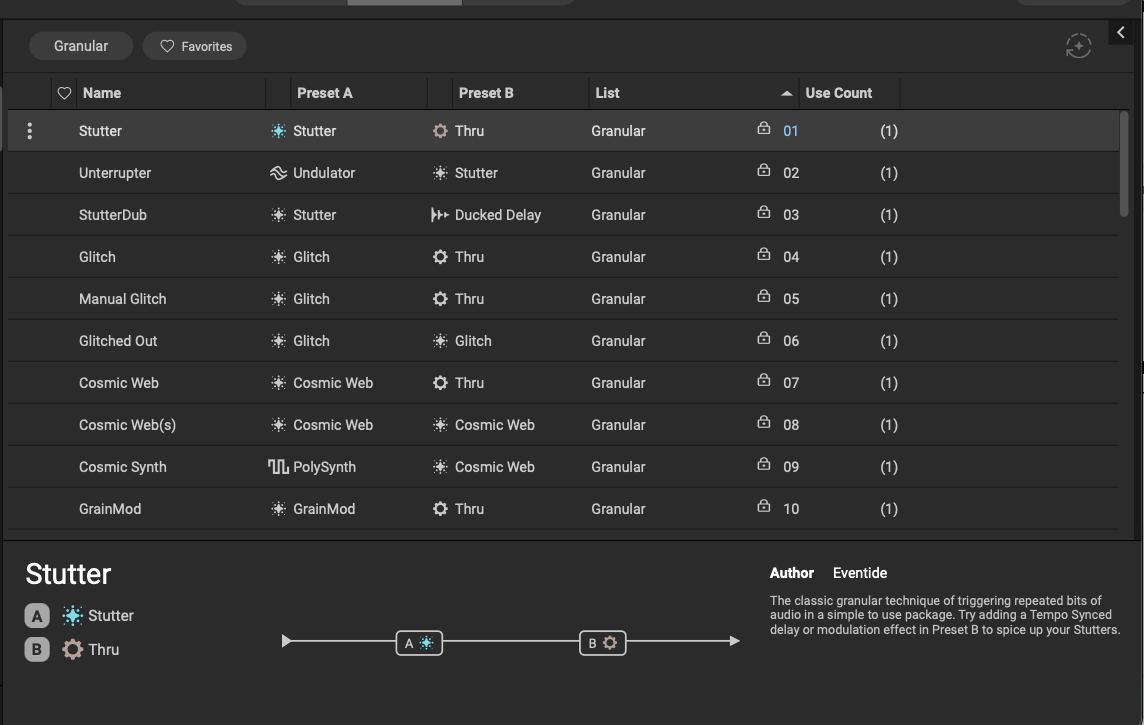
          Using H90 Control is the best way to do this since you can view the Program notes which add some hints and suggestions for how to use the Program.

          Click the “Programs” tab at the top and then select the “Granular” list.

          https://cdn.eventideaudio.com/manuals/h90/1.12.5/content/h90-control/program-library.html

          Screenshot 2026-01-05 at 3.21.47 PM

          You can also use the pedal UI by clicking the Programs button, turning the left knob until you see the “Granular” list, and turning the Select knob to scroll through the list.

      Viewing 1 reply thread
      • You must be logged in to reply to this topic.