
Home › Forums › Products › Rackmount › NEED HELP SETTING UP H9000/X8GEN2/LOGIC › Reply To: NEED HELP SETTING UP H9000/X8GEN2/LOGIC

I can only reiterate what I said before.
I don’t run logic, so I can’t really do a video tutorial, but can run through it on a 1 on 1 session if you can share your screen via teams. When my daughter arrives for the school holidays, I’ll see if I can do a logic tutorial then, but that won’t be for a few weeks.
As you have the UFX3 and the H9000 on the Mac you have a few things to work out.
1) Did you want to run the H9000 via USB, as an aggregate device with your UFX3, or are you connecting it via ADAT, Analog or MADI to your UFX3 (you can combine all of these, but lets keep it simple first and just pick 1).
2) Next on the H9000 you need to connect your chosen inputs to an FX Buss. To do this you need to go into algorithm view (or you can use the algorithm view in the combined view. There is a little arrow between 16 and17 on the green bar at the top. When you click this, you’ll see all of the available inputs. The image below shows it expanded.
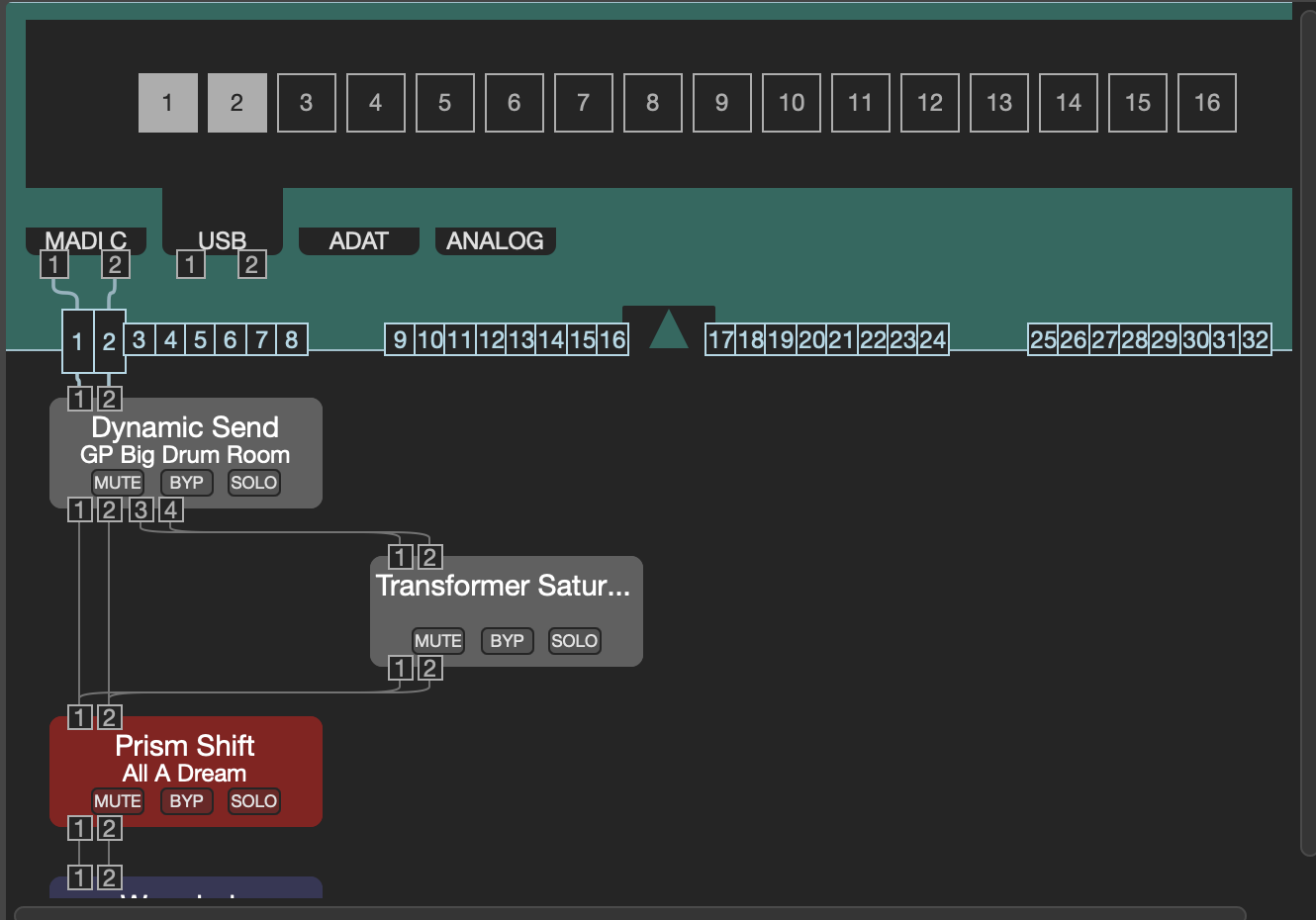
3) Select USB, ADAT, MADI, Analog and then click on the big square buttons to select them for this chain. In this case I’ve selected USB 1 and 2, and MADI 1 and 2.
4) Connect the newly generated smaller boxes to the chain inputs below. In my example I’ve connected MADI 1 and 2 to the chain 1 and 2 inputs.
5) Close the arrow at the top and repeat with the outputs at the bottom.
A few things to remember. An input can be used more than once, but an output can only be fed by 1 thing.
6) If you used USB then you will need to use the Logic I/O utility placed as an insert or onto an Aux send to route audio to and from the H9000 USB ports you used above. Make sure that you don’t have the notification in Emote that USB is muted. You need to have the USB synced with your Mac.
7) If you are routing via the UFX 3 you’ll need to use TotalMix to route audio to the relevant output and input.
