
Home › Forums › Products › Stompboxes › Where is the H90 firmware download?
Tagged: firmware
- This topic has 7 replies, 4 voices, and was last updated 8 months, 1 week ago by
bgoan.
-
AuthorPosts
-
-
December 21, 2025 at 3:04 am #193972
I’m trying to update my H90 and found this downloads page: https://www.eventideaudio.com/downloads/?product=H90+Control
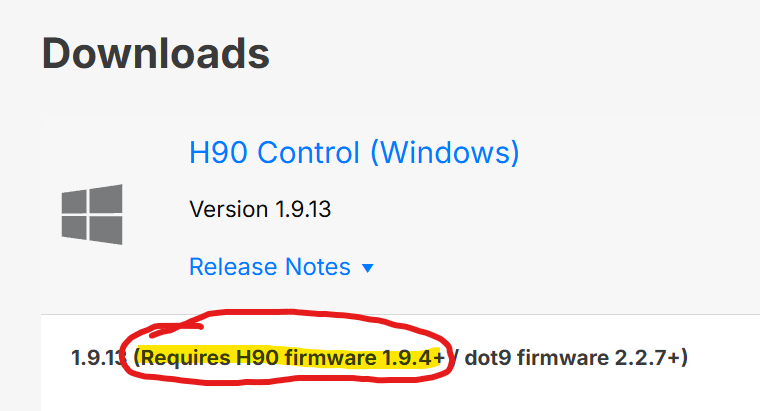
I can’t get that version to connect to my H90. I see it says that version of the software requires firmware 1.9.4 which I don’t think I have. When I look in the about page on the H90 I see a bunch of numbers but none is labeled “firmware”. However, I also don’t see anything labeled “1.9.4” so I’m assuming I don’t have 1.9.4. I’m also assuming mine is older because I bought it a few years ago and have never updated the firmware.
So if that software requires firmware 1.9.4 there must be some way to update the firmware without that software for people who don’t have firmware 1.9.4 (right?). But I can’t find the firmware download or instructions on how to install it WITHOUT that software.
Can someone point me to instructions on how to update the firmware WITHOUT the H90 control software that seems to require a firmware version that I don’t have?
-
December 21, 2025 at 3:13 am #193973
<p style=”text-align: right;”>May have misread this but what’s the issue with the H90 control app? If you install it, connect H90, it should prompt to update any firmware, irrespective of the age of the unit.</p>
-
December 21, 2025 at 3:17 am #193974
My H90 does not show up when connected. The link I provided above says that version of the H90 control requires firmware 1.9.4, which I don’t think I have. Presumably that is why it doesn’t show up.
I need the 1.9.4 firmware update. I can’t find that.
-
December 21, 2025 at 3:18 am #193975
-
December 21, 2025 at 3:22 am #193977
Ahh Ok, not sure then. Sorry matey. Hope it gets sorted.
-
December 21, 2025 at 3:31 am #193978
Website says to use H90 control to update the firmware but the website also says H90 control requires firmware I don’t have.
I’m finding it difficult to make any sense of that combination of instructions.
-
December 21, 2025 at 5:21 am #193980
When you first open H90 Control, click on the tiny cloud icon in the lower righthand corner. It should look similar to the image of the H90 shown on the left here:
https://cdn.eventideaudio.com/manuals/h90/1.12.5/_images/System-Bluetooth-device.png
-
December 21, 2025 at 10:32 am #193981
I had to remove the H90 from my Control, then re-add it, to get the little “cloud” symbol to become active and let me do the firmware update.
-
-
-
AuthorPosts


- You must be logged in to reply to this topic.
