
Home › Forums › Products › Stompboxes › H90 Dual Mode DAW
- This topic has 10 replies, 4 voices, and was last updated 1 month, 3 weeks ago by
jimfowler.
-
AuthorPosts
-
-
August 25, 2026 at 4:12 pm #198717
Hello Eventide community,
I want to use my H90 as an external effects processor with my DAW. I’m currently using Ableton Live Lite and would like to create a stereo send/return path.
I’m using an audio interface and want to route audio from Ableton to the H90, process it there, and then send the stereo signal back into Ableton.
Could someone please explain the setup step by step?
Which outputs on my audio interface should I connect to which inputs on the H90?
Which outputs of the H90 should go back into which inputs on my audio interface?
Which input/output configuration should I select on the H90?
And how should I set up the routing in Ableton Live?
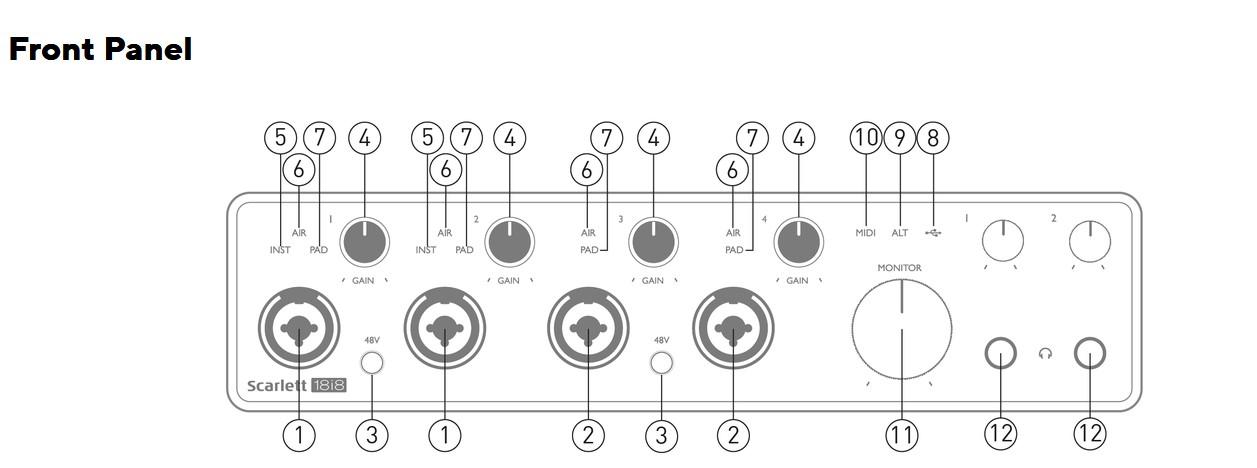
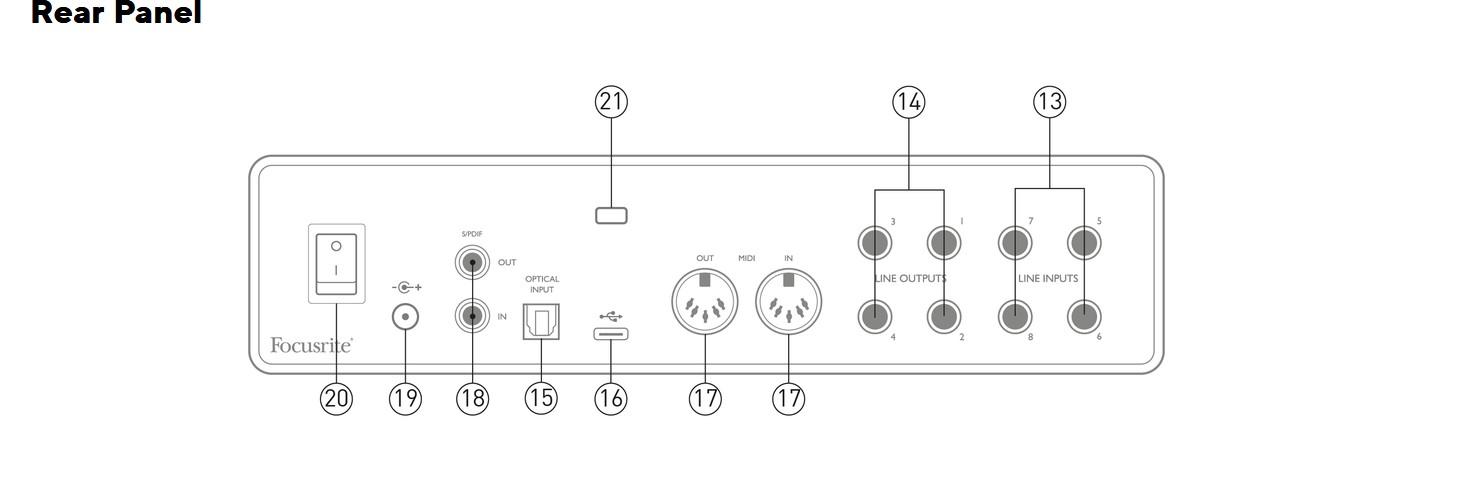
I’ve read through the manuals and tried several input configurations, but I still can’t seem to get my head around the correct routing. I’d really appreciate some help.Thanks in advance! See photo’s of interface below.
Greetings from the Netherlands,
Max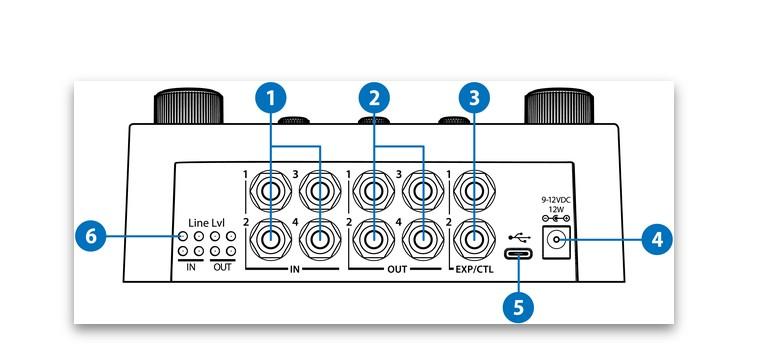
-
August 25, 2026 at 7:57 pm #198735
Hi Max!
This depends on what you’re trying to achieve and what your current configuration is, but for a simple stereo send/return you do not need to use Dual Mode. You can use any available outputs on your 18i8 to send audio into inputs 1&2 on the H90, and then run outputs 1&2 from the H90 back into any available input on the 18i8. You will need to do some configuration in the Focusrite Control software to avoid creating a feedback loop.
Which outputs on my audio interface should I connect to which inputs on the H90?
I would suggest sending outputs 3&4 on the 18i8 into inputs 1&2 on the H90.
Which outputs of the H90 should go back into which inputs on my audio interface?
Since you’re using inputs 1&2 you can then send outputs 1&2 from the H90 into line inputs 5&6 on the rear of the 18i8.
Which input/output configuration should I select on the H90?
You should use the default Insert Mode, and switch your I/O to Line Level. Just press and hold the Programs and Routing buttons down for a second to access the System Menu, and then scroll to I/O, press Select, and change In Levels and Out Levels from Instrument to Line.
And how should I set up the routing in Ableton Live?
First, you need to configure your Focusrite Control software. Assuming you’re using Focusrite Control 2 you will want to change the source for the outputs you chose (3&4) from Mix or Analogue inputs to Playback (DAW) and choose Playback 3-4. Then, in Live go to Preferences, click Audio, then click Input Config and make sure inputs 5&6 are enabled and named, then click OK and to go back and click Output Config and make sure outputs 3&4 are enabled and named, then click OK. Once that’s set up just go to Audio Effects in the Library column and grab an External Audio Effect and drag it onto an unused Return Track (Return C, for instance) in Live, and make sure you select 3&4 in the ‘Audio To’ field, and 5&6 in ‘Audio From’ field. Now, anything you send to Return C will be sent through the H90 and back into Live. You can set the Return track up to be Pre or Post, whichever you prefer. Next, in the Options drop down menu in Live, make sure you have the Delay Compensation option enabled. Lastly, since you wish to use a Return in Live, go to the System menu in the H90 and under Global turn to Page 2 and set Kill Dry to On. This will ensure that the H90 only returns the wet signal back to Live so you can blend this in with your tracks.
I’d also suggest keeping the volume very low while getting this all set up, just in case you accidentally trigger a feedback loop.
-
August 28, 2026 at 1:32 pm #198867
Thank you so much for your reply!
My original plan was to use the H90 in Dual Mode to add both pre- and post-effects to my guitar tracks. In my current setup, all effects have been pre-effects so far, and I was specifically looking for a way to add post-effects such as delay and reverb.
I didn’t realise that I could achieve something similar using Insert Stereo Mode, so that was already very helpful to learn.
I’ve now gone through all the steps you described, but I’ve run into another problem: in the version of Ableton Live Lite I’m currently using, I can’t add the External Audio Effect device. As far as I understand, this means I would need to switch to another DAW—or upgrade my version of Ableton—to use the H90 as an external effects processor in this way.
I don’t think there is another way to do this in Live Lite without the External Audio Effect device, but if there is a workaround, I’d love to hear about it!
In any case, thank you again for your really helpful and detailed reply. I really appreciate you taking the time to explain it all.
Best regards,
Max from the Netherlands
-
-
August 28, 2026 at 7:20 pm #198882
Hi Max,
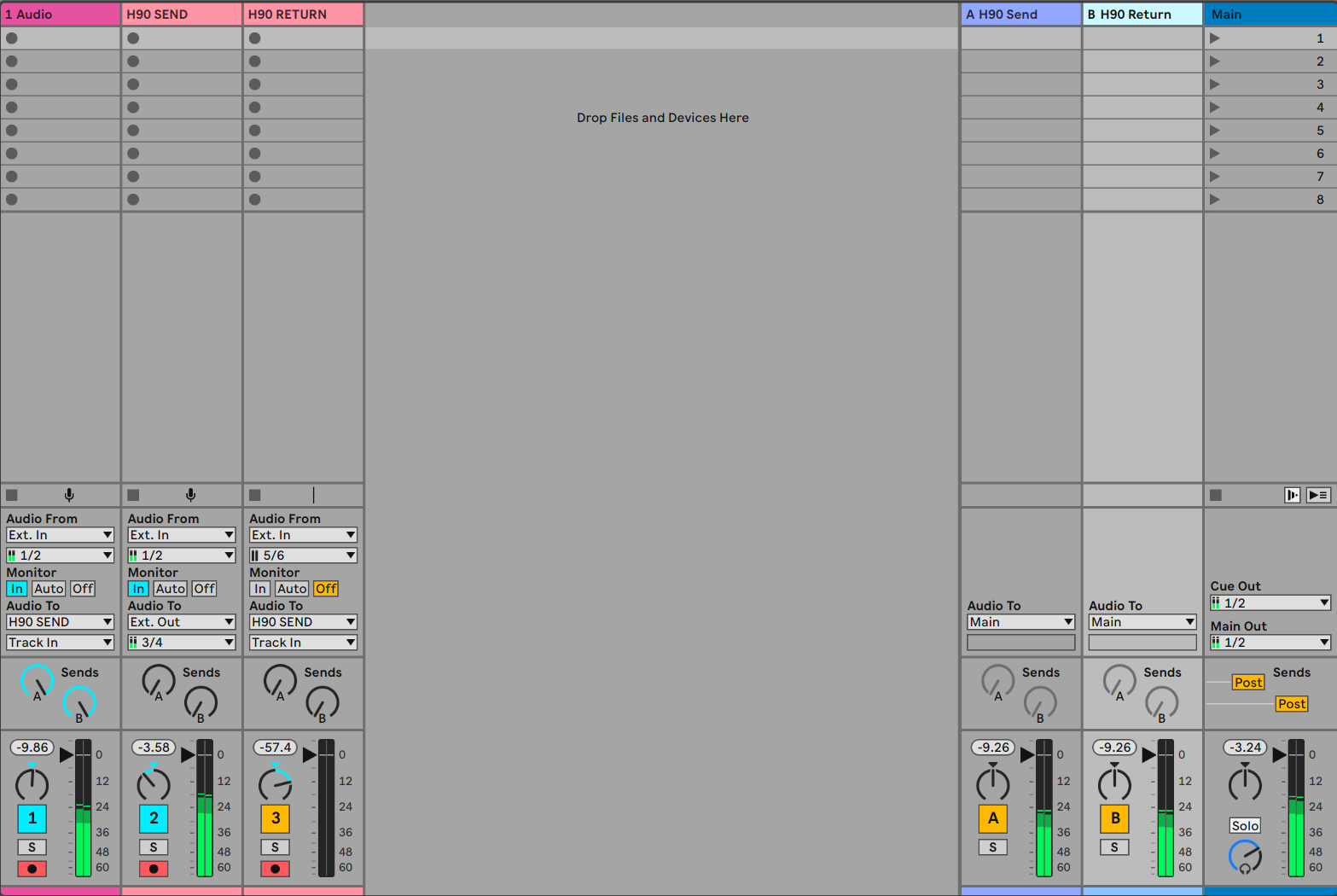
While I would definitely suggest upgrading to Ableton Live Standard or Suite, there is a way to do something similar using only the Focusrite Control software and Live Lite. In the routing tab in Focusrite Control 2, assign outputs 3&4 to Playback 3-4. Then in Live route the output of your source track to Ext. Out 3&4, then create a second audio track set Ext. In to 5&6 to record the wet H90 signal. There will be some latency with this method, so you would want to monitor through the 18i8, and choose ‘Off’ under the Monitor section on the wet H90 track. You can also use the Track Delay slider in Live to nudge the track around and align it with the source material and the rest of your session. You can also enable Kill Dry in this configuration to record only the wet signal from the H90, and blend the dry signal with the recording after the fact.
-
August 30, 2026 at 5:27 am #198933
Al.ost there. What isn´t right? thnx so much/
-
-
August 31, 2026 at 4:25 pm #199270
-
August 31, 2026 at 5:58 pm #199299
Hi,
On Track 1 the ‘Audio To’ should be routed to Ext. Out 3&4, and on ‘Track 2’ the Audio From should be routed to Ext. In 5&6. This way all of the dry audio recorded on Track 1 will be sent through the H90 and back in to Live on Track 2.
If you’re recording a live performance through inputs 1&2 on the 18i8 then you would just need to set up the 18i8 so the source of Output 3-4 is Analogue 1-2. Then in Live you’d just need to set one track to record Inputs 5&6.
I would also suggest reaching out to Focusrite directly for tips on how to best use their hardware and Focusrite Control software with your setup.
-
September 4, 2026 at 9:05 am #200120
-
-
September 5, 2026 at 9:08 am #200166
My goodness. Eventide.. going above and beyond.
someone needs to keep the “Redditors” outta here. Everyone buying gear.. just because. And then need to be told how to use it?!?
Upgrade Ableton. You’ll just run into more issues.
-
September 5, 2026 at 9:39 am #200170
Uh, I beg your pardon. I asked a sincere question. I’ve been obsessed for weeks with getting my H90 to work in my DAW. Nothing worked, so I turned to the forum for some help. That’s kind of what forums are for, right?
So, if I upgrade my DAW, that should solve the issue? Thanks for the tip, professor gear dude!
-
-
September 5, 2026 at 7:09 pm #200194
eventide support has always been top shelf.
not trying to be one of those “just buy more gear” guys but i’d recommend an interface with more I/O so you can take full advantage of the H90. in this way you could have TWO stereo sends/returns instead of just one.
another option for getting sound to/from the H90: ableton has a very useful “external audio effect” plug-in. unfortunately, it is only available in standard and suite (i have a live 12 suite license i’m not using…let me know if you wanna go shopping).
-
-
AuthorPosts


- You must be logged in to reply to this topic.
