
Home › Forums › Products › Stompboxes › Feature Request / Routing Question: Global Pre-Insert Direct Output on H90
- This topic has 5 replies, 2 voices, and was last updated 1 day, 11 hours ago by
 ercekmert.
-
AuthorPosts
-
-
October 30, 2026 at 8:04 am #206527
Hi Eventide Team,
I am currently integrating the H90 into a dual-rig setup involving a Strymon Iridium and a physical tube amplifier.
I am using Insert Routing with the Iridium placed in Insert 1 (Output 3 – Input 3) so that I can run Post-Iridium effects (Delay + Reverb) directly to the PA/Front of House via Main Output 1.
However, I also want to send the signal to my tube amp without the Iridium amp/cab emulation in the chain, while keeping the H90’s time-based effects active for both outputs, globally across all programs.
Since Output 3 is bound to Send 1 in Insert Mode, is there a way (or a planned feature) to route a dedicated global parallel output/aux feed pre-Insert 1 directly to Outputs 4 or 2?
I’ve tried dual routing setup but the problem in that option is I cannot route Path A Presets to Path B as well. I’m only allowed 1 preset each path. 2 is already enough for me but I just need “with or without Insert” option on different outputs.
If this isn’t possible via current global settings, please consider this a formal Feature Request for a future firmware update to introduce a Global Split Routing Parameter (allowing a pre-insert tap to be mirrored to an unused output like Out 2 or 4).
Thanks in advance for your support, have a nice day !
Attachments:
You must be logged in to view attached files. -
October 30, 2026 at 8:32 am #206530
This is the schematic btw:
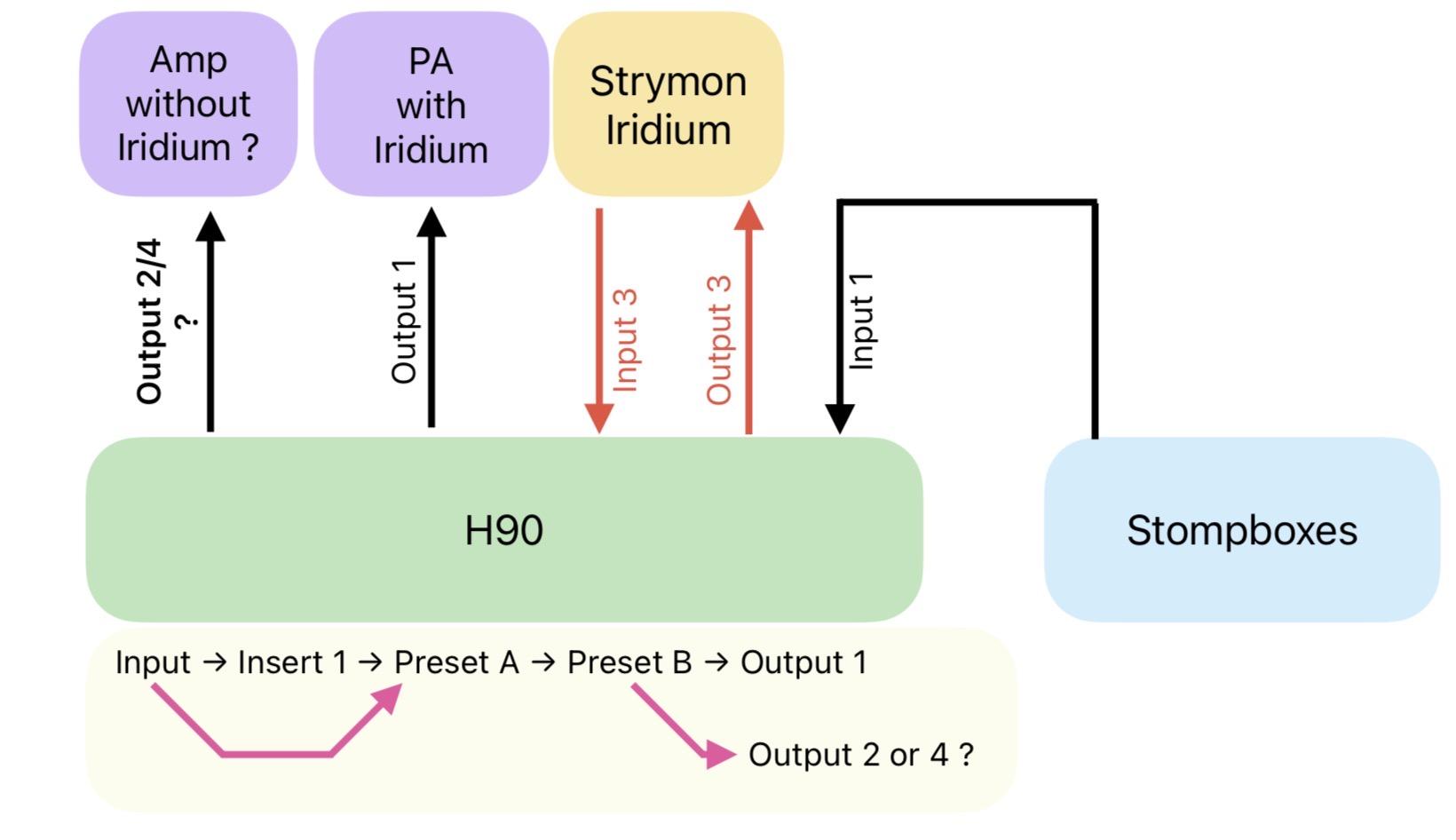
-
October 30, 2026 at 9:03 am #206531
Hello,
There is currently no option to enable this globally, but you can accomplish this using the 2nd insert. You will need to set this up per-Program.
Note that Insert 2 cannot be routed before Insert 1, so I would suggest you use Insert 2 for the Iridium.
- Connect Input/Output 4 to the Iridium
- Connect Output 3 to your tube amp
- Configure both Inserts to be in the Pre position (see my attached screenshot)
- Set the Mix of Insert 1 to 50%
Let me know if you have any questions.
Attachments:
You must be logged in to view attached files. -
October 30, 2026 at 9:35 am #206533
Thank you for the detailed suggestion and the screenshot!
I followed your instructions to utilize Insert 2 for the Iridium and set up the routing per-Program and it worked. In previous routing experiments, I was feeding Output 1 to the Iridium (going into the PA) and Output 2 to my physical stage amp. The main goal of this setup was to run time-based effects after the Iridium while keeping a parallel line for the amp.
However, I’ve run into a specific operational issue with this current method during live performance scenarios:
Often, I need to switch instantly from a heavy ambient program (full delay/reverb) to a completely dry tone on the fly. To do this quickly on stage, I usually toggle the Program switch to bypass. But because the Inserts are tied directly to the Program configuration, bypassing Program inadvertently drops the Inserts as well—which takes the Iridium completely out of the signal chain.
Is there a way to keep the Inserts (specifically Insert 2 for the Iridium) globally active or persistent in the background, even when bypassing or changing program states, so that the core amp-modeling path doesn’t get cut off?
Thanks again for your continued help!
-
October 30, 2026 at 12:15 pm #206540
You’re welcome!
You can set the P Bypass mode to “AB Only” and the inserts will stay active when you bypass the Program.
https://cdn.eventideaudio.com/manuals/h90/1.9.7/content/system-menu/global.html
-
October 30, 2026 at 8:24 pm #206551
And with that I’ve complete solution, thanks again for your help 🙂
-
-
AuthorPosts


- You must be logged in to reply to this topic.
