
Home › Forums › Products › Stompboxes › H9 Control Android 13 Galaxy Tab S6 Lite
- This topic has 11 replies, 2 voices, and was last updated 11 months, 2 weeks ago by
 axman53.
-
AuthorPosts
-
-
October 31, 2025 at 4:56 pm #193079
Since the update a few days ago, the control app on android is useless. It does not see my finger presses. Whatever I tap, the tablet takes my touch as a minimize command and minimizes the control app. I can’t do anything with it. Infuriating. What’s up with this?
-
November 1, 2025 at 12:13 pm #193083
Unintalled then reinstalled the app, same problem. Can’t even get to settings to log into my account.
-
November 3, 2025 at 1:17 pm #193102
Hello,
Sorry to hear you are having issues and thanks for reporting this. Please follow the steps below and let me know what happens:
- Open your tablet’s settings
- Go to “Apps” and select H9 Control from the list.
- Check H9 Control’s “Permissions”.
- If any permissions are denied for H9 Control, particularly “Nearby Devices”, go ahead and allow them.
-
November 3, 2025 at 3:47 pm #193109
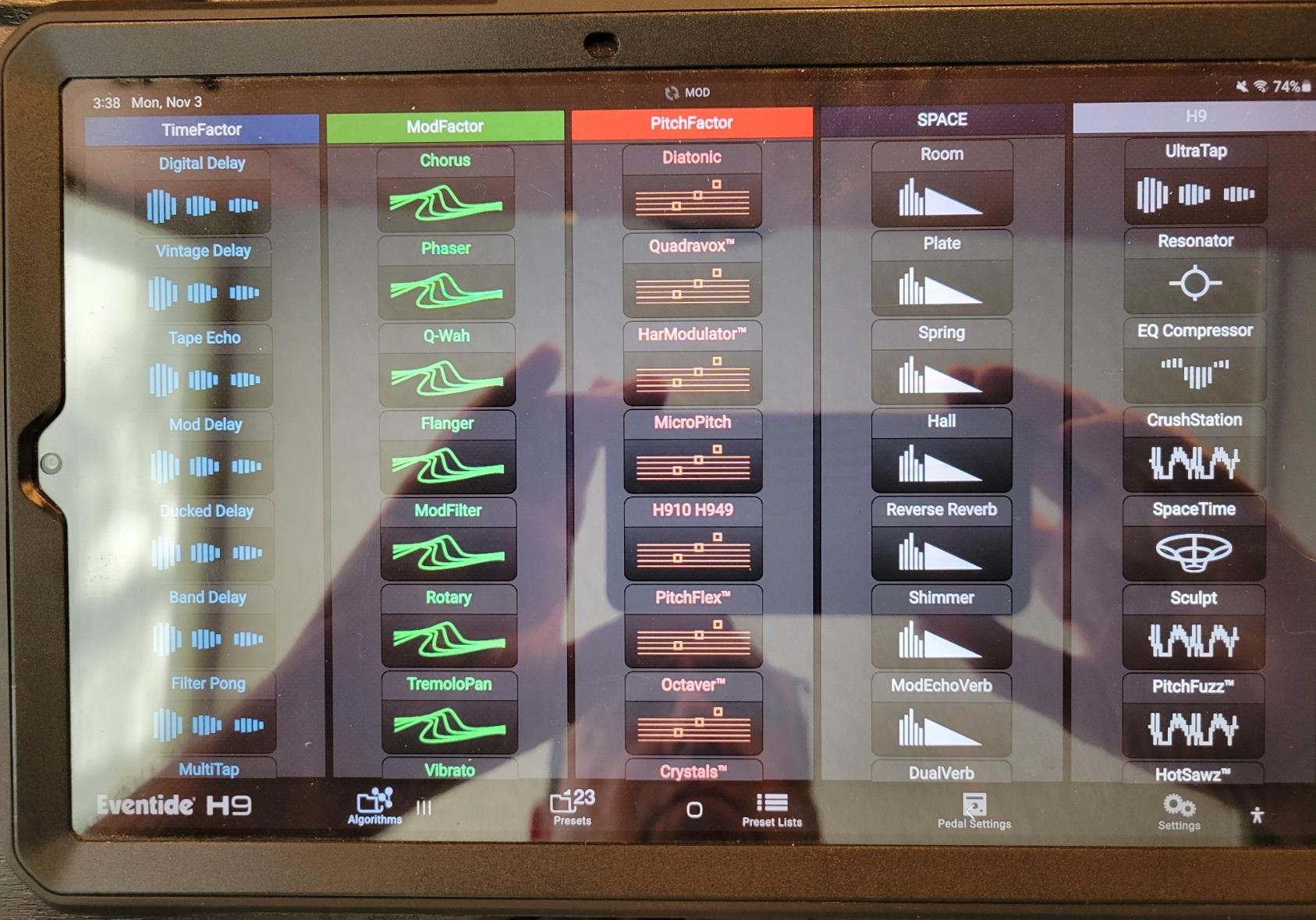
Both available permissions were disabled. I enabled them both, restarted the tablet. I was prompted to login to my account, which I did. H9 Control connected to the H9 pedal. But still no joy when trying to do anything in app. None of the button presses on the bottom of the app window work. If I press an app button near one of the Android control controls (home [ ], scroll apps |||, back <) Android responds with those actions. It’s as if the H9 Control app does not have focus when using any of the button presses on the bottom of the app window. However, if I press any of the algorithms in the main window of the app, those function somewhat normally. Pic attached.
-
November 3, 2025 at 3:49 pm #193110
And come to think of it, I don’t believe that the Android controls were visable at all with the app in foreground prior to this update. I’m sure the bug has something to do with that.
-
November 6, 2025 at 5:16 pm #193159
Hello? Is there anybody out there? I’m stuck with an app that does not work making my H9 frozen in time.
-
November 7, 2025 at 10:33 am #193165
Hello,
We’re aware of this issue but don’t have a workaround for you to try. We’ll try to get this fixed in an update as soon as we can.
Do you have a computer or phone you could use instead of the tablet? That is my best suggestion for now.
-
-
November 7, 2025 at 10:59 am #193167
My phone is also Android, so I don’t think that would fare any better. I do have a Windows desktop and laptop, and I think I remember you having a Windows version of H9 Control. That would get me through for now. But you are going to eventually fix the Android app, yes???
-
November 7, 2025 at 11:06 am #193169
Yes, we plan on addressing this issue.
It seems that this only happens with certain devices, so you may be able to get it to work on your Android phone. It would be very helpful if you could give that a try and let us know if it works or not.
You can download that app for Windows here: https://www.eventideaudio.com/downloads/?product=H9+Control+App
-
-
November 7, 2025 at 7:37 pm #193175
The Android app works fine on my phone, a Samsung Galaxy S-21 (SM-G991U) running Android 15. Go figure…
-
November 7, 2025 at 7:43 pm #193176
I installed the Windows app but it looks like it wants a cabled connection to the H9??? Does it not talk Bluetooth? I am being prompted for MIDI device to connect to. I’ve never seen that on the Android apps. Please advise.
-
November 8, 2025 at 12:30 pm #193183
I installed the Windows app but it looks like it wants a cabled connection to the H9??? Does it not talk Bluetooth? I am being prompted for MIDI device to connect to. I’ve never seen that on the Android apps. Please advise.
Figured it out, thanks.
-
-
-
AuthorPosts


- You must be logged in to reply to this topic.
