
Home › Forums › Products › Stompboxes › H9 Gen 2 troubleshooting connecting bluetooth
- This topic has 7 replies, 3 voices, and was last updated 1 month, 3 weeks ago by
tbskoglund
Eventide Staff.
-
AuthorPosts
-
-
September 4, 2026 at 6:23 am #200104
Hello,
Thank you for this update allowing bluetooth connection with the new H9 gen2.
I am able to connect it to my Mac but it doesn’t work with my iPad.
In the new Bluetooth menu on the H9 I set Bluetooth “On”, the blue led goes on blicking.
But when touch the bluetooth button in Eventide Control it says : “searching for Bluetooth LE MIDI Device…” and “no device found”.
I’ve tried to switch on/off the iPad and the H9 but no more success.
My Setup :
iPad Pro 10.5 pouces, iOS 17.7.11
Eventide Control for iPad v2.2.0
H9 gen2 Software 1.2.2.177
Thank you for your help.
-
September 4, 2026 at 12:16 pm #200121
Hi, sorry for the issues you are having.
The iPad you are using is a bit old and I’m not entirely sure if we support that, but it does seem like it should meet the specs to connect to the H9 via Bluetooth.
When you click the Bluetooth icon in the Eventide Control app, you should see the menu below. Is something else happening?
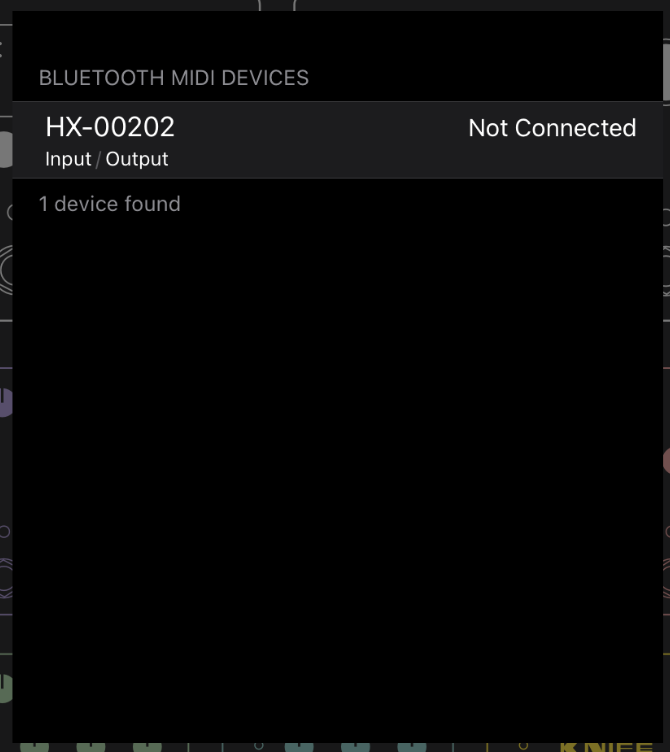
Also, have you tried forgetting the device on the H9 after connecting to your Mac?
If you choose to “Forget” the Mac your H9 is paired with, you must also remove the H9 Bluetooth device from the Mac Bluetooth settings before your H9 can reconnect. To do this, go to the Mac System Settings > Bluetooth menu, locate the H9 Bluetooth device, right-click it and select “Forget”. After this, repeat the instructions to pair using Eventide Control.
-
September 4, 2026 at 4:52 pm #200135
Hi,
I’ve done the “Forget” thing both on the H9 and the Mac.
I know the iPad is a bit old but it’s iOS 17.7. And the system requirement to use “Eventide Control” on iPad is iOS 15.
So it should work.
Here is the result I’ve got on my screen…
Thank you for your advices.
Attachments:
You must be logged in to view attached files. -
September 4, 2026 at 4:52 pm #200137
Hi,
I’ve done the “Forget” thing both on the H9 and the Mac.
I know the iPad is a bit old but it’s iOS 17.7. And the system requirement to use “Eventide Control” on iPad is iOS 15.
So it should work.
Here is the result I’ve got on my screen…
Thank you for your advices.
Attachments:
You must be logged in to view attached files. -
September 6, 2026 at 10:37 pm #200235
Having the same problem with a new ipad and no luck whatsoever anybody else having this issue ?
-
September 8, 2026 at 5:41 pm #200401
Can you please be more specific?
Which iPad model do you have and what OS are you running?
At what point are you having issues?
-
-
September 8, 2026 at 4:40 pm #200399
???
-
September 8, 2026 at 5:40 pm #200400
We are trying to reproduce your issue with a similar version of your iPad hardware but we have not be able to track this yet. I’ll let you know when there are any updates.
In the meantime, you can use a wired connection from the H9 to your iPad if you like.
Sorry for the inconvenience.
-
-
-
AuthorPosts


- You must be logged in to reply to this topic.
