
Home › Forums › Products › Stompboxes › H90 Cant PC and Bypass CC together. *BUG*
- This topic has 36 replies, 10 voices, and was last updated 2 days, 23 hours ago by
tbskoglund
Eventide Staff.
-
AuthorPosts
-
-
October 26, 2024 at 7:11 pm #185803
MC6 PRO
I can send a PC message of 50 for example and it loads
I can send a CC of value = 0 “P ACT/BYP M” and it will deactivate. Send a value of 127 and it will activate.
I cannot send both the above. It wont work. Even with a delay message in between from the morningstar controller. Am I missing something. I am pretty sure this is just a bug
-
October 26, 2024 at 7:17 pm #185804
We are aware of this problem, but please report your request to support@eventideaudio.com so developers can better assess priorities. Thank you.
-
October 27, 2024 at 4:07 pm #185808
Thank you. I have emailed support. I have tried everything I can think of here. Put the messages first in the chain. Delay to the max(1260ms) no changes.
-
November 4, 2024 at 1:33 pm #186006
Thank you. I have emailed support. I have tried everything I can think of here. Put the messages first in the chain. Delay to the max(1260ms) no changes.
I have been going back and fourth with support and they said
“This is just how the MIDI was implemented on the H90, but it can be improved in the future”
Not being able to load and change the bypass state of a patch is EXTREMELY basic behaviour for any pedal. Let alone the one I dropped over $1300 for. It’s broken… not implemented that way
-
February 26, 2025 at 1:20 am #188356
Is there any update on this? Still driving me crazy. Causes havoc with my setup!
-
February 26, 2025 at 11:48 am #188376
Sorry to hear this is causing you issues. After looking into this issue further we have confirmed that a simultaneous MIDI PC+CC will work correctly on the previous firmware version 1.8.6. We are looking into a fix for this for a future update. If you’d like to downgrade your pedal, please email support@eventide.com and I can help you do that.
-
June 9, 2026 at 1:27 pm #195727
Any update here? Kind of bonkers we can’t send PC + CC in the latest update.
-
June 9, 2026 at 3:21 pm #195729
Sorry, no updates at this time. I can notify you here when we have a fix for this.
-
June 15, 2026 at 10:50 am #195783
Please do. If you could, please escalate this as a high priority bug. I feel like the H90 is being severely limited due to having to choose between PC and CC commands. Getting the H90 back up to MIDI standards would ease a lot of frustration with the device.
Right now the only workaround is copying a preset and adjusting the parameters, which is a major nuisance as it quickly spirals into being unmanageable and untrackable. I should be able to find a sound I like and tweak the parameters via CC in the same MIDI command. I am using a Quad Cortex and the only MIDI commands I have access to are via scene changes, and this works for everything else in my chain just fine.
Thank you!
-
-
July 8, 2026 at 3:05 am #196052
Has this been fixed yet? I’m having the same problem with my RJM GT 16. When can we expect the update to fix this? A pedal at this price point should not have these issues, and the fact that you all have known about this issue since 2024 is insane. This was the first Eventide pedal I’ve ever purchased and what a let down it has been. PLEASE FIX THIS!
-
July 8, 2026 at 1:13 pm #196062
I’m very disappointed. I was thinking of buying an H90 for my pedalboard, and whilst checking this forum to see if there were any issues, I’ve discovered this major problem that’s remained unresolved since 2024! What’s more, it turns out that the same problem exists with the new H9 Gen 2. I asked one of the testers to check, and he confirmed that the problem is the same. It’s very disappointing coming from a premium brand like Eventide. I expected better. In the meantime, I’ll have to look to the competition, as Eventide isn’t doing anything to resolve this issue.
-
July 8, 2026 at 1:17 pm #196063
Sorry to hear of your disappointment. We do realize this is an important feature and we’re working on the fix.
-
-
July 20, 2026 at 5:11 pm #196169
How is this still an issue? i bought an h90 when released and this worked i ended up selling it about a year ago. and just got another one recently and Now i cannot use this feature which is basically the only way i use it. Please prioritize this to fix.
-
July 21, 2026 at 10:14 am #196181
Hello,
It is a top priority of ours to fix this issue.
If you’d like, we can help you install the previous firmware version where it worked. Please email support@eventideaudio.com for help with that.
-
-
July 22, 2026 at 10:53 am #196201
Hello, It is a top priority of ours to fix this issue. If you’d like, we can help you install the previous firmware version where it worked. Please email support@eventideaudio.com for help with that.
Is there a timeline on this? Or anywhere we can track the progress without simply waiting for release notes?
I, like I suspect most users who use the latest firmware, don’t consider downgrading to an earlier version an option.
-
July 22, 2026 at 1:04 pm #196209
Sorry, we can’t provide a timeline or any way for you to track our development progress. But I assure you, it’s a top priority as I’ve already mentioned.
Once this fix is ready, I’ll be notifying this forum thread, as well as emailing anyone who has reached out to customer support. So anyone who is waiting on this fix will be notified once it is available.
Thanks for your patience.
-
July 29, 2026 at 10:23 am #196542
Any update on when this will be available?
-
July 29, 2026 at 10:32 am #196543
Sorry, no. We can’t provide a timeline, but it’s a top priority.
-
July 29, 2026 at 10:58 am #196544
so should we expect this in the next h90 update or is this something we could get a year from now? does the H9 have the same issue? trying to decide if i need to sell my h90 its literally unusable for me without this feature.
-
July 29, 2026 at 11:30 am #196545
Yes, the H9 Gen2 has the same bug.
-
July 29, 2026 at 3:24 pm #196559
Sorry, but I’ve already mentioned that we can’t provide a timeline. We’re working to make the fix available as soon as we can, but we don’t have any further information to provide.
If you need the feature, you can install a previous version of the software. If you’d like to do that, please contact support@eventideaudio.com
-
September 3, 2026 at 6:01 pm #200080
Has this been fixed yet?
-
-
July 29, 2026 at 11:31 am #196546
I had to sell mine. I won’t use something that fights me
-
August 7, 2026 at 5:29 pm #196893
I’ve been following this thread for over a year, I have two H90’s… My pedalboard builder has had my gear for a while since we are working on a very custom I/O structure and that has helped me be patient. But I’ll be having my system back by September 2026 and I am worried that using my H90’s will not be feasible if I program a song by structure seeing there’s plenty of times I need to pull up a program with one preset bypassed.
-
August 7, 2026 at 6:13 pm #196906
Ya man unfortunately given the nature of the way they have responded to this thread I don’t think there is any priority here. They will likely keep sweeping it under the rug given there is no timeline for a fix. That or they don’t have a competent enough development team to figure out how to fix it. Their product is unusable for me right now im only using it for midi clock and just only using three presets and manually turning them on and off. . I’ve seen other companies who actually prioritize things have a fix out within a week. A year is just crazy.
-
August 8, 2026 at 5:21 am #196910
I understand the frustration, but your comment seems a bit unfair. In this very thread they actually responded to you twice saying it indeed now is a “top priority” and that they will “make the fix available as soon as we can”. Not providing a timeline is very common and no company I know of fixes literally every bug / feature the community asks for quickly. Or can you name one?
-
August 8, 2026 at 7:12 am #196912
I understand this issue has been around for quite a while, but …
Pedals like the H9 and H90 cover a lot of ground so they have to satisfy a lot of very diverse users. Unfortunately, that spreads the software developers thin.
Eventide released four innovative Granular algos, a new version of the Control App, and a whole new version of the H9 in the last 9 months. And the Control App is still in public beta at the moment. So it’s not like these guys walked away from everything and went on vacation. Also, they need to sell pedals to keep the lights on so I don’t blame them for prioritizing a new pedal release.
That said, I wouldn’t be surprised if they clear this up along with some other known issues soon after the new H9 dust settles. Only time will tell though.
.
-
-
August 8, 2026 at 7:35 am #196913
… and no company I know of fixes literally every bug / feature the community asks for quickly. Or can you name one?
Actually, Eventide is known for being responsive to user requests.
Very soon after the H90 was released, users clamored for an algorithm that did the Whammy thing (a variation on one of the 10 new algos at the time) and Eventide did it in very short order.
People complained about H90 program management in the Control app and Eventide substantially revamped Control to improve the user experience.
And before the H90 was even released people complained that the H9 OG didn’t have enough vintage style guitar effects. The H90 came with new algos for tape delay, analog delay, SP2016 reverb, and Instant Phaser/Flanger. All vintage effects.
People asked for Granular effects and Eventide gave them a set of four algos all at once … for free.
And, Eventide maxed out every single H9 OG when they released the H9 Gen 2 … for free and without anyone even asking them for that.
IMHO that’s a pretty good track record.
-
August 8, 2026 at 10:20 am #196914
IMHO that’s a pretty good track record.
No argument there. My point was, that no company / product is perfect and there will always be some bug / feature missing. That’s why I put the word “literally” in my sentence 😉
-
August 8, 2026 at 6:01 pm #196945
Understood and sorry I was not clear. I completely agreed with your point.
-
-
September 8, 2026 at 12:38 pm #200366
Hi all,
This has been fixed and is currently available for you to test as a public beta release.
To test out the fix:
- Install the latest version of Eventide Control: https://www.eventideaudio.com/software/eventide-control/
- Click the burger icon in top left corner, and select “Settings”
- Check the “show beta releases” option
- Click the cloud icon to view the update menu
- Select the 1.13.2 release, and click update
Once this release is installed, you will be able to send a PC+CC message without needing to program any delay between the two messages. We have tested this with a number of MIDI devices, but there may be differences with how your MIDI device works, so please report any issues you may have.
Note that you must configure your MIDI controller to send the PC message first, followed by the CC, to load the new Program and then adjust the parameters for this to work properly.
If you do experience issues, please email support@eventideaudio.com with details about your MIDI device and how it is programmed and we can help you further there.
Thanks for your patience.
-
September 17, 2026 at 7:26 pm #201107
Has this been tested with any RJM Music Technology gear? I have the mini effect gizmo’s MEG X’s and an RJM GT 16 and it still doesn’t seem to work?
-
September 17, 2026 at 7:27 pm #201112
Working on my PBC6X
-
September 17, 2026 at 7:41 pm #201113
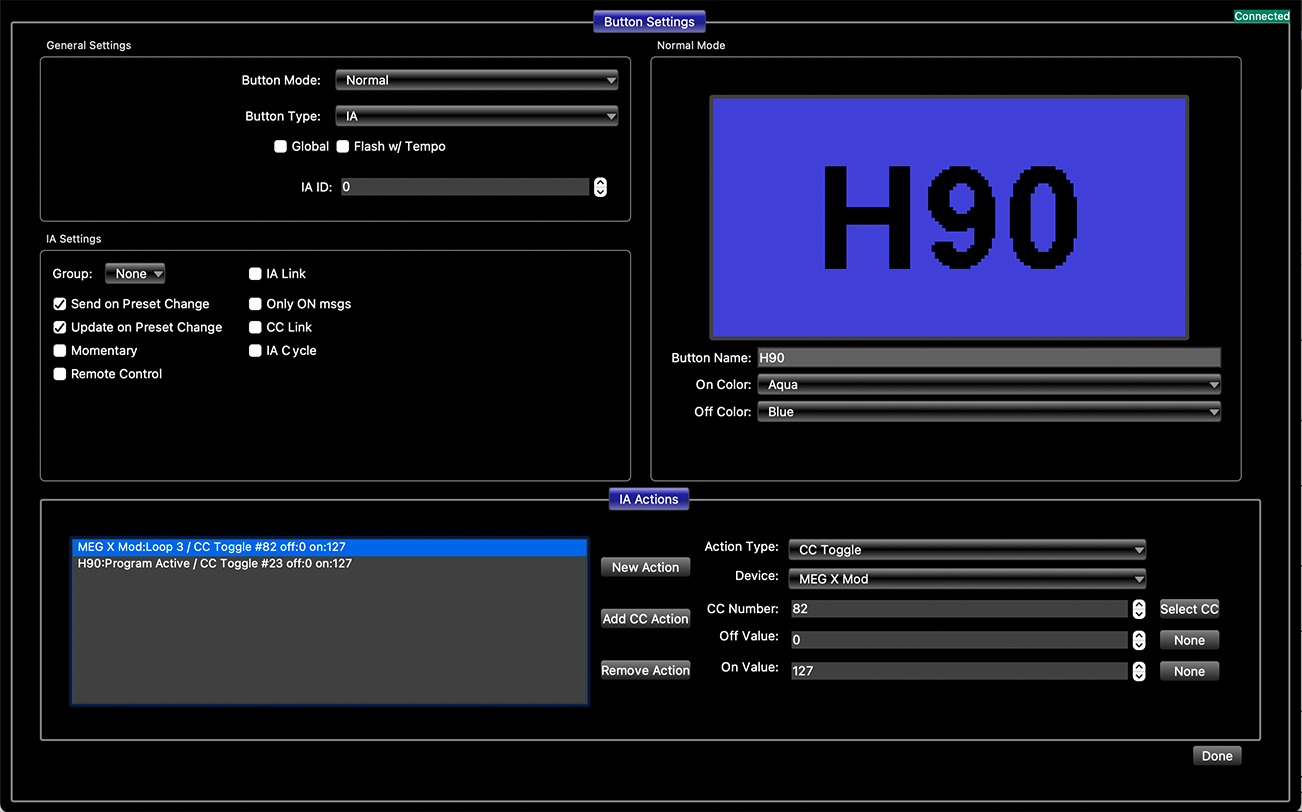
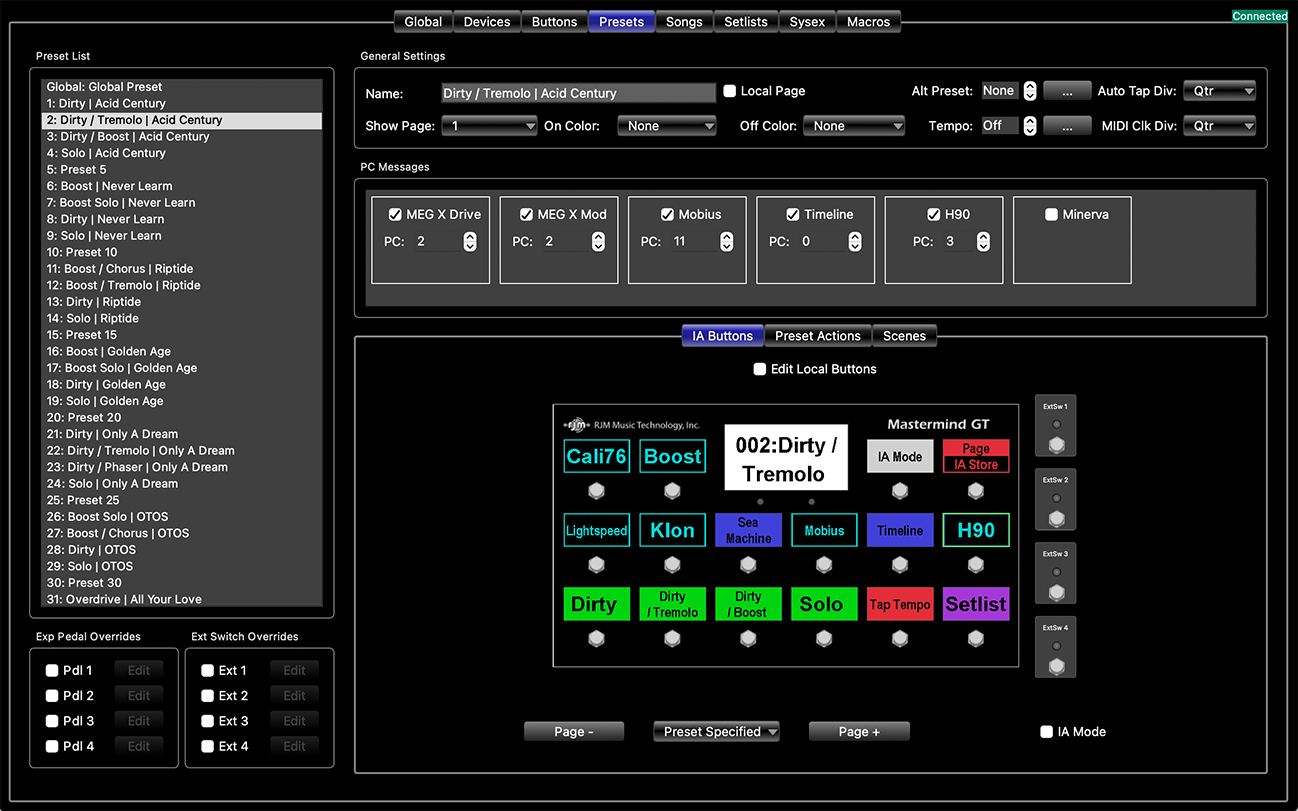
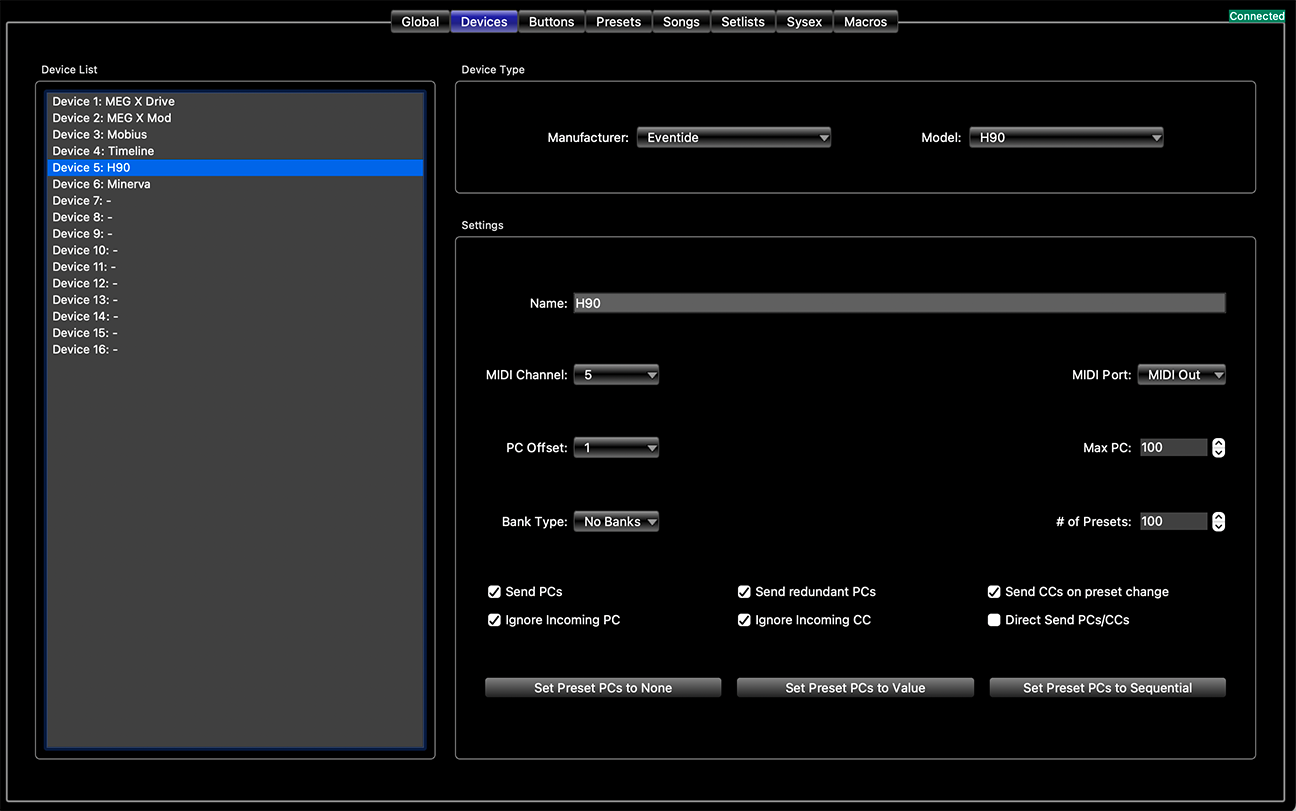
What CC are you using on the H90? Do you see anything wrong Steve?
-
September 17, 2026 at 7:45 pm #201118
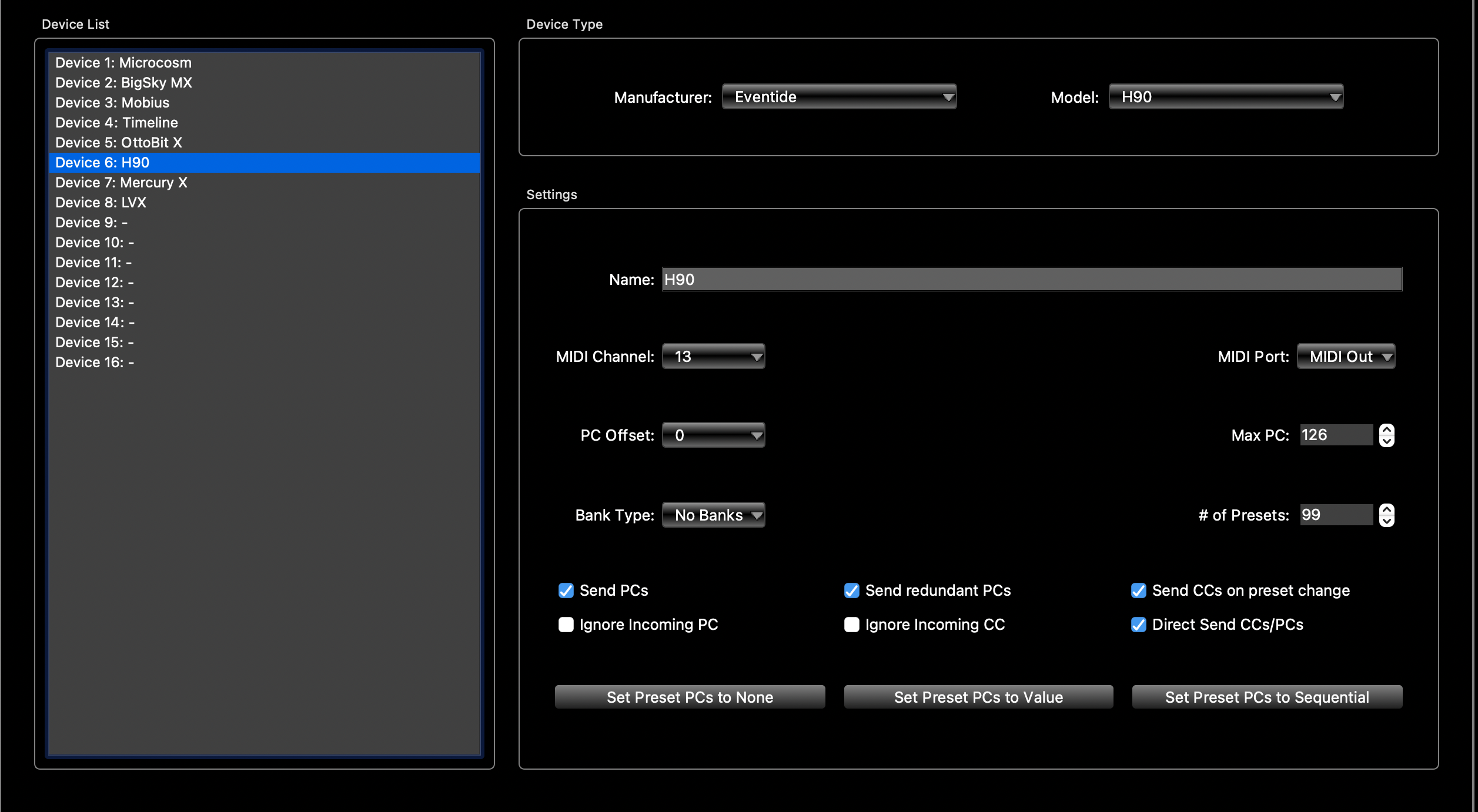
this is how my device page is. You set the BYpass on the h90 pedal right?
-
September 17, 2026 at 9:21 pm #201159
Do you mind sharing your buttons page for the H90 and Presets Page for that preset so I can see how you have that set up? Are you referring to the bypass in the global setting? DSP or AB Only? I tried both of those still nothing. The H90 firmware I have is 1.13.2.88.
-
September 18, 2026 at 11:15 am #201633
The Program Bypass setting on H90 (DSP or AB Only) will not make a difference.
You need to map the H90 to use the Global (M) active/bypass command to whatever CC you are using for active/bypass. https://cdn.eventideaudio.com/manuals/h90/1.9.7/content/appendix/global.html
Your screenshot looks like you are using CC 82 for active/bypass. Before you try using the PC command, is your CC mapping working?
Once everything is mapped on the H90 and you have confirmed you can use CC 82 for active/bypass, you should do the following:
- Send PC5 followed by CC 82 – Value 0. This should load Program 5, then make it bypassed
- Send PC5 followed by CC 82 – Value 127. This should load Program 5, then make it active
-
-
-
AuthorPosts


- You must be logged in to reply to this topic.
