
- This topic has 13 replies, 4 voices, and was last updated 3 weeks, 2 days ago by
tbskoglund
Eventide Staff.
-
AuthorPosts
-
-
February 24, 2026 at 10:10 am #194773
In some scenarios, I would be wanting to run 16 algorithms seperately. so they don’t bleed into each other. As these algorithms are predominately stereo, I would look to route 32 MADI channels in pairs (NOT stereo linking BTW!) to 16 algorithms. So, in each FX chain, I would need to have 4 algorithms in parallel, and routed to a total of 2 channels per algo, i.e: 8 channels of MADI. Is there a MADI template I can download for this?
Also, are Eventide working on an upgrade to allow the UI to access more than 4 algorithms per FX chain?
-
February 24, 2026 at 12:34 pm #194775
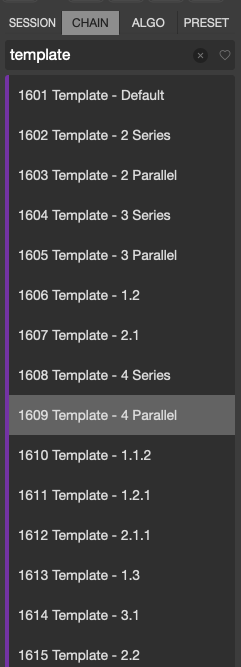
There are many Factory FX Chain templates that can be found in the 1600 bank as seen below. The 1609 template I have highlighted gives you 4 algorithms in parallel, though you will need to route the hardware outputs of your FX Chain for your workflow and setup.
More algorithms per FX Chain is not a simple UI update. The H9000 uses 4x quad core ARM DSP processors. There are 4 algorithms per chain because there are 4 cores per DSP processor; each algorithm runs on a core.
Allowing more algorithms per FX Chain is not a simple task, thought it may be something we can add in a future update. I cannot provide any guarantees or timeline for this.
The Gen2 DSP processors allow for more powerful algorithms to be run per core, and our focus for upcoming releases is more powerful algorithms that take advantage of the new processors.
-
February 25, 2026 at 9:20 am #194778
Ah, thanks.
is there also the option to copy an algorithm from within one chain to another as appointed to having to drag it from the list of algorithms on the left column or import from an external drive? I may need the same algorithm with the same custom settings in two different fx chains for example.
-
February 26, 2026 at 7:37 am #194795
You’re welcome.
There is no copy algorithm function.
The easiest way to do this is to first save your algorithm as a preset which will allow you to save your custom settings, then use the browser menu to drag that algorithm preset into a new FX Chain.
-
February 27, 2026 at 3:31 pm #194802
It only allows me to save to my Mac. Must be doing something wrong.
-
February 27, 2026 at 4:11 pm #194803
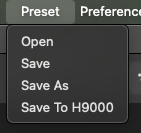
Save or Save as will save it to your computer.
Save to H9000 will save it to the H9000 memory, and then your preset will show up in Emote’s browser window.
-
March 1, 2026 at 6:01 am #194810
thanks
-
August 14, 2026 at 7:25 pm #197236
There is no copy algorithm function.
This is very true, and ridiculous. I’ve been waiting for this alongside many other basic features since 2019.
There is no copy algorithm function. The easiest way to do this is to first save your algorithm as a preset which will allow you to save your custom settings, then use the browser menu to drag that algorithm preset into a new FX Chain.
I asked for this simple copy/ paste function back in 2020. I’m so disappointed that Eventide has been unable to add even this simple feature to their flagship effects processor.
https://www.eventideaudio.com/forums/topic/h9000-emote-wishlist-undoredo-copypaste-etc/#post-116102”The Gen2 DSP processors allow for more powerful algorithms to be run per core, and our focus for upcoming releases is more powerful algorithms that take advantage of the new processors.”
”Allowing more algorithms per FX Chain is not a simple task, thought it may be something we can add in a future update. I cannot provide any guarantees or timeline for this.”
UI and feature improvements should really take priority at this point in updating the H9000. Even over new algorithms. H9000 has now even been upgraded with the gen2 processors. Why are you still restricting its potential (even the gen1 potential) with these user interface limitations? You’ve said it yourself back in 2019. “In the nearer term, we are planning to add the ability to connect between DSPs in the next release, so you’ll be able to connect up to 16 effects without tying up analog IO and patchbay connections. This is supported natively in the system, but we don’t have a UI for it just yet.”
And “So, I think that ideally, we’d figure out a way to extend the current model so you could have 8 algorithms in an FX chain instead of 4, without restrictions on how they are laid out.”
“Sorry but this won’t be something that will make it to the next H9k firmware release. It is still something that is being discussed and a feature that we’d like to include in a future release. Thanks for your patience. ”Eventide has been resting on the H9000’s laurels as their ’flagship’ processor, while the actual workflow remains outdated. A product this expensive needs features that justify its price tag. You sold us the H9000 with promises of updated features, yet you’ve mostly just added a few algorithms. What was promised in 2019 is still not here — not even after we bought the costly Gen2 upgrade.
It’s not the hardware that’s lacking, but the basic UI and firmware. Please give us the needed UI upgrade already! -
August 26, 2026 at 7:27 pm #198800
I was just scrolling through some algorithms, to see there are a few 8 in/8 out. If the H9000 were to have 4 different stereo pairs of MADI connected to one 8 in/8 out algorithm, would the audio from some channels bleed into others, even though inputs 1-8 are routed to outputs 1-8, i.e.: not summed to channels 1-2? If there’s no bleedover, then I would be tempted to add a second MADI card and begin hunting for another MOTU interface with MADI.
-
August 27, 2026 at 8:13 am #198817
The audio won’t bleed between channels unless the algorithm is designed to do that.
For example, my mixing algorithms blend tracks, by design.
In the absense of signal processing to blend channels, there is no crosstalk between the channels.
-
August 27, 2026 at 8:40 am #198818
In that case, I would ask that Eventide add 8 in/8 out versions of every algorithm on the H9000 with no cross talk between channels. This would be awesome! or is this easy to do myself in vsig?
-
August 28, 2026 at 8:45 am #198861
How easy it is depends on the algorithm. It also may not be possible for every algorithn depending on how much CPU and memory is used.
Two big challenges for doing this are keeping the user interface useable and optimizing efficiency behing the scenes.
Also Eventide have a few tricks with some factory algorithms not available in VSIG. Finally, you’ll run out of algorithm ID’s or it will at least become very messy.
-
September 12, 2026 at 5:00 pm #200571
Not to sound thick or lazy, but how can I tell which 8 in/8 out algorithms have channel crosstalk and which ones don’t?
-
September 14, 2026 at 10:40 am #200653
If you right click an algorithm from the browser list you can select “More info” and this will sometimes include details about the input/output structure.
The same info can be found in the Algorithm Guide of the user manual: https://cdn.eventideaudio.com/manuals/h9000/2.2.11/content/appendix/algorithms/index.html
Attachments:
You must be logged in to view attached files.
-
-
AuthorPosts


- You must be logged in to reply to this topic.
